
Why AI Keeps Giving You Vague, Generic Answers — and the 30 Seconds That Fix It
The same AI will hand you a useless list or an expert answer. What decides it isn't the model — it's what you typed. This short report shows you the plain-English structure behind a great prompt, and gives you a prompt builder that asks you for it every time. One ordinary file on your computer. Nothing to install, nothing that renews.
This is the difference a built prompt makes
One person typed what came to mind. The other answered six plain-English questions and pasted the result. Neither of them knows anything about prompt engineering.
The prompt
Why are my tomato plants dying?
There are several common reasons tomato plants struggle. Here are the most likely culprits:
- Watering issues. Both overwatering and underwatering can cause wilting and yellowing. Tomatoes prefer consistent moisture.
- Nutrient deficiency. Nitrogen, calcium, or magnesium shortfalls are common.
- Pests. Aphids, hornworms, and whiteflies can all damage plants.
- Disease. Early blight, fusarium wilt, and septoria leaf spot are frequent in tomatoes.
- Insufficient sunlight. Tomatoes need 6–8 hours of direct sun daily.
- Soil pH. Aim for a pH between 6.2 and 6.8.
To narrow things down, inspect the leaves closely and consider the plant's age and recent weather.
…and four more bullet points.
The prompt
You are a practical, experienced gardener who explains things in plain language.

Here's what I need help with:
My tomato plants look terrible and I don't know why.

My situation:
I'm in Fort Worth. I water every morning. The leaves are turning yellow at the edges.

What I want back:
A simple step-by-step plan.

Please keep in mind:
I'd rather not spend more than $50, and I want to fix it this weekend.
Yellowing that starts at the edges while you're watering daily in North Texas clay is almost always drowning roots — not thirst. Clay holds water far longer than a daily schedule assumes.
This weekend, nothing to buy:
- Stop watering completely for four days. Push a finger two inches down — if it's damp, don't water.
- Saturday morning, pull mulch back six inches from each stem so the crown can dry out.
- Then water deeply once, and not again until the top two inches are dry. In your heat that's roughly every third day.
One thing to check: if the yellow patches have brown centers rather than clean yellow, that's early blight instead — strip the affected leaves and tell me, because the fix is different.
Don't fertilize. Feeding a plant with waterlogged roots makes it worse.
The three things the second prompt did that the first one didn't
Named who should answer
"A practical gardener who explains things plainly" produces a different answer than no instruction at all. This one line changes more than any other.
Gave it the details only you know
Fort Worth. Watering daily. Yellow at the edges. Without those, the AI has no choice but to list every possibility and let you sort it out.
Said what the answer should look like
A step-by-step plan, under $50, done this weekend. Asked for a shape and a limit, you get a plan — not an essay.
- The report (PDF). Five parts, seven discoveries, one sitting. Instant download after checkout.
- The exact wording that makes AI build the tool for you. You don't write the file yourself — you ask for it, in plain English, using the phrasing in the report.
- The seven-line reference card. The whole method on one page you can keep beside you.
- The thirty-second ownership test. Proof the tool is yours, run on your own computer today.
- Included The prompt builder itself — the finished file. The exact builder you can try further down this page, sent to you as a single file to save on your own computer. Unbranded, yours to rename, edit, and use forever. You're not starting from an empty page: you get a working tool on day one, and the report shows you how to make it your own.
No account to create. No software to install. Nothing renews.
That second prompt wasn't written by hand. It came out of a form — six plain-English questions, filled in once. Try the real builder below, then keep it: this exact file comes with the report.
The answers aren't wrong. They're just useless.
And you can't quite tell whose fault that is.
So you assume it's the AI. You try rewording it. You try a different model. You add "be specific" to the end and get a slightly longer version of the same thing. Somewhere along the way you decide this stuff is overhyped and go back to doing it yourself.
Here's what's actually happening. A short question gives the AI almost nothing to work with, so it does the only safe thing available: it covers every possibility. That's why you get the bulleted list of six causes instead of the one that applies to you. The answer isn't vague because the AI is weak. It's vague because the question was.
And on the rare occasion you do write a good one — the long, detailed kind that produces something genuinely useful — it vanishes into a chat thread you'll never find again. So the next time, you type the short version from memory and get the list of six causes all over again.
Why the usual advice doesn't fix it
Ask how to get better answers out of AI and you'll hear the same three things: learn prompt engineering, save a swipe file of templates, or subscribe to a prompt tool.
The first asks you to memorize a framework and recall it under pressure. The second gives you a folder of other people's prompts that never quite match your situation. The third works — right up until you look closely and realize you're renting a form with some dropdowns and a copy button.
All three miss the same thing. You don't need to remember the structure of a good prompt. You need something in front of you that asks for it. Six plain questions, answered in forty seconds, assembled into the kind of prompt you'd never have written from memory at eleven at night.
And here's the part almost nobody realizes: a complete working form like that — the fields, the dropdowns, the button that assembles your finished prompt — fits inside a single ordinary file saved on your own computer.
Double-click it, and it opens as a working tool. No installation. No account. No internet required. No subscription. Ever.
This isn't hidden on purpose. It's hidden by habit. App stores trained you to believe real software gets installed. Subscriptions trained you to look for a pricing page instead of asking whether there's a version you could simply keep. You may have already double-clicked one of these files by accident, watched it open in your browser, and closed it thinking you'd made a mistake. That moment was the whole mechanism working perfectly — and it read as an error.
That's what “hidden in plain sight” actually looks like.
One-File Prompt Builder Secret
One-File Prompt Builder Secret by C.A. Staffel is a short, focused report built around one reveal: seven specific, connected discoveries that turn a single ordinary file into a prompt builder you fully own — so the good version of the prompt is the one you use every time, not the one you wrote once and lost.
Not a course. Not a coding lesson. Not another broad AI guide.
One problem — answers that sound right and help nothing. One solution — a builder on your own computer that asks you the right questions and answers to no one.
Seven discoveries that form one complete picture of ownership
Each discovery includes what it is, why it matters, why most people miss it, and how to use or test it the same day you read it.
-
How one file stays whole and working no matter where it travels — and the single plain-English phrase that secures this advantage from the start
-
Why opening the file is the entire “installation,” and what that removes forever
-
A thirty-second test that proves — not promises — that you truly own the tool
-
How the same file follows you to any computer you'll ever use, with no accounts, no syncing services, and no device limits
-
How the tool improves over time in plain English, without you learning a single line of code — plus the two-habit safety routine that makes breaking it nearly impossible
-
A one-minute trick that makes the file launch like an installed app, sitting one click away next to your everyday tabs
-
And one quiet property — saved for last because it's the biggest — that gives the identical, unchanged file a second life far beyond your desktop
All seven, in order, with the tests and habits that make each one stick.
Get Instant Access — $9.95Stop rebuilding, renting, and worrying about losing the tool you rely on
- You stop rebuilding the same prompts from memory — the same fields produce the same quality, every time
- You stop paying rent on a form with dropdowns
- Your tool works on a plane, in a dead zone, during an outage — because there's no server anywhere in the picture
- You stop worrying about a tool being discontinued, redesigned, or paywalled out from under you
- You gain a tool that opens the same way today, next year, and ten years from now
Small discoveries with surprisingly large consequences
- The one sentence to include in any AI request that locks in the entire one-file advantage — most people never think to say it
- The “airplane-mode test” — thirty seconds that turn I read that I own this into I know I own this
- Why the absence of a setup step makes people think something's broken — and what the missing friction actually means
- The email trick that makes your tool effectively indestructible and reachable from any device, in about a minute
- The protective six-word phrasing that lets you improve your tool endlessly without ever wrecking the version that works
- Why bookmarks can point somewhere almost nobody realizes — and how that one minute decides whether your tool gets used daily or forgotten
- The single sentence about how browsers treat files that unlocks the report's biggest discovery — “the file never knows the difference”
- The first-hour sequence, the first-week checklist, and the seven-line reference card that condenses the whole reveal into something you'll keep
Every one of these is in the report, explained plainly enough to use tonight.
Get Instant Access — $9.95Built for everyday AI users, not developers
This is a one-sitting read, deliberately. Five focused parts, seven discoveries, no padding, no theory detours.
You want a simpler way to organize and use your prompts.
This report is for the everyday AI user who's juggling prompts across notes apps and old chats, or quietly paying monthly for a simple form — and suspects there's a simpler way the experienced people are doing it.
You don't need any technical background. If you can save a file, copy a file, and double-click a file, you already have every skill the report requires.
You want a coding course or a general AI guide.
It's not for developers looking for coding instruction, and it's not a general AI or productivity guide.
It does one job.

One sitting replaces months of not-quite-finding-it
Could you piece this together on your own? Possibly — if you knew exactly what to look for, which is precisely the problem.
The pieces are scattered across technical tutorials that bury the simple path, assumptions that point you toward subscriptions, and details that experienced people treat as too obvious to mention.
The report hands you the complete set in one place, in order, with the tests and habits that make each piece stick. One sitting of reading replaces months of not-quite-finding-it — and every month of fees you'd have paid while not finding it.
It ends the way a useful report should: a compact reference card, three priorities to remember above everything else, two permanent habits, and one small action you can take the same day you finish reading.
And because the finished builder comes with it, the first action is already done for you — there's a working tool on your computer before you've read a page of the method.
Questions people ask before buying
Do I get the prompt builder, or instructions for making one?
Both. The finished builder comes with the report as a single file you save on your computer — the same one you can try on this page, unbranded and yours to keep. The report then shows you how to have AI build your own from scratch, using the exact phrasing that makes it come out as one self-contained file.
The file is the head start. The method is the part that matters, because a tool you can rebuild and change is a tool nobody can take away from you.
Do I need to know how to code?
No. If you can save a file, copy a file, and double-click a file, you have every skill this requires. You never write code — you describe what you want in plain English and AI does the building.
Which AI does this work with?
Any of the main ones — ChatGPT, Claude, Gemini, Copilot. Nothing in the method is tied to one company, which is also why nothing here can get paywalled out from under you later.
Does this work on a Mac? A PC? My phone?
Mac and PC both, because the file opens in a browser you already have. One of the seven discoveries covers getting it onto a phone or tablet as well, using the same unchanged file.
How long is it, and how fast do I get it?
It's built to read in one sitting — five parts, seven discoveries, no padding. The download link appears the moment checkout completes, and it lands in your email too.
Is there anything else to buy after this?
No. $9.95 covers the report and the builder file together. There's no upsell page, no subscription, and nothing that expires.
Is the builder file locked down in any way?
No. It carries no branding, no licence check, and no expiry. Open it in any text editor and every line is readable. Change the questions, rename it, put it on as many of your own machines as you like.
What if it's not for me?
Email me and I'll refund you, no deadline and no questions. Given what the report is about, it would be strange to make you feel locked into anything.
Put a working prompt builder one click away today
Download One-File Prompt Builder Secret now, read it in one sitting, and run the thirty-second ownership test on your own computer today. By tonight, you can have a working prompt builder sitting one click away — owned, offline-ready, and permanently yours.
P.S. Every subscription you've ever cancelled took its tool with it. The file this report shows you how to own doesn't work that way. No renewal date. No vendor. No server to fail. It was never out of reach — it was one saved file away the whole time. The only question is whether you'll keep looking straight past it.
— C.A. Staffel
This is what a one-file prompt builder does
Answer a few plain questions on the left. The file assembles the finished prompt on the right — the kind of structured, detailed prompt that gets a genuinely useful answer instead of a vague one. No writing skill required, no coding, nothing to install.
1 · You fill in the form
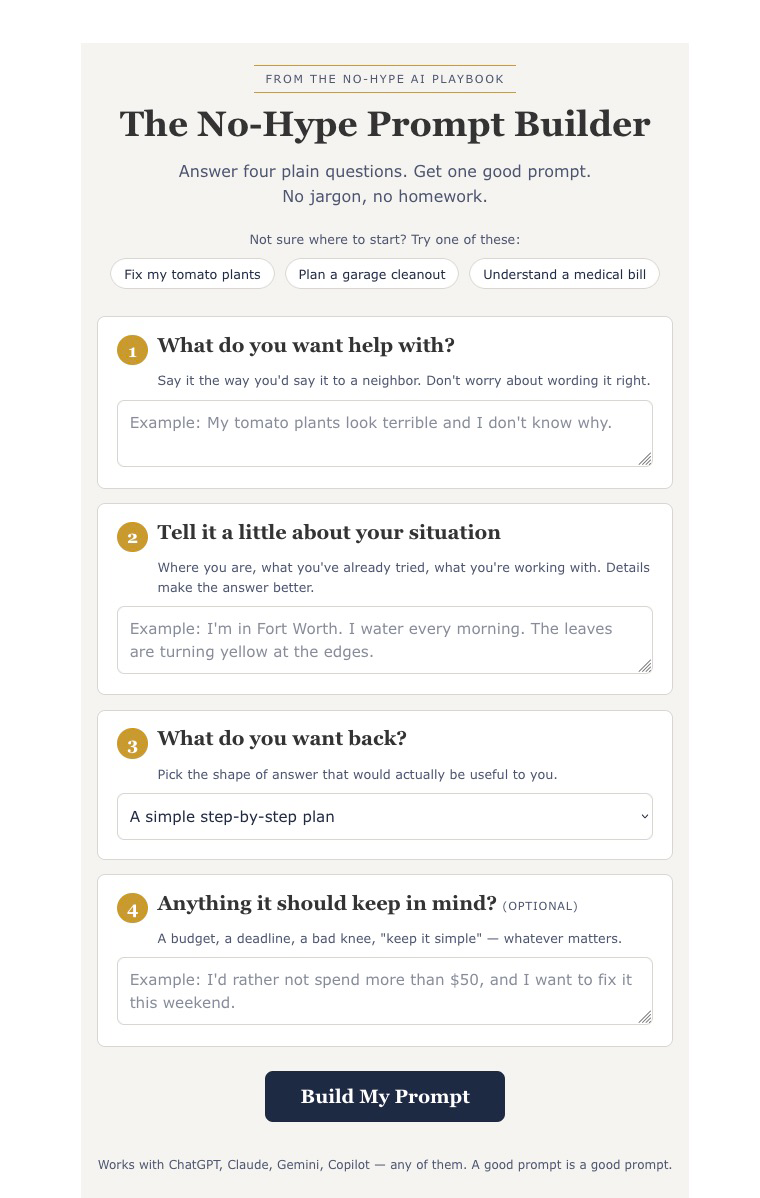
2 · It builds your prompt
That's the whole idea. One ordinary file on your computer, holding a form you fill in once and use forever — no login, no monthly fee, and it still works with the internet off. This exact file comes with the report, and the report shows you how to make it your own.